


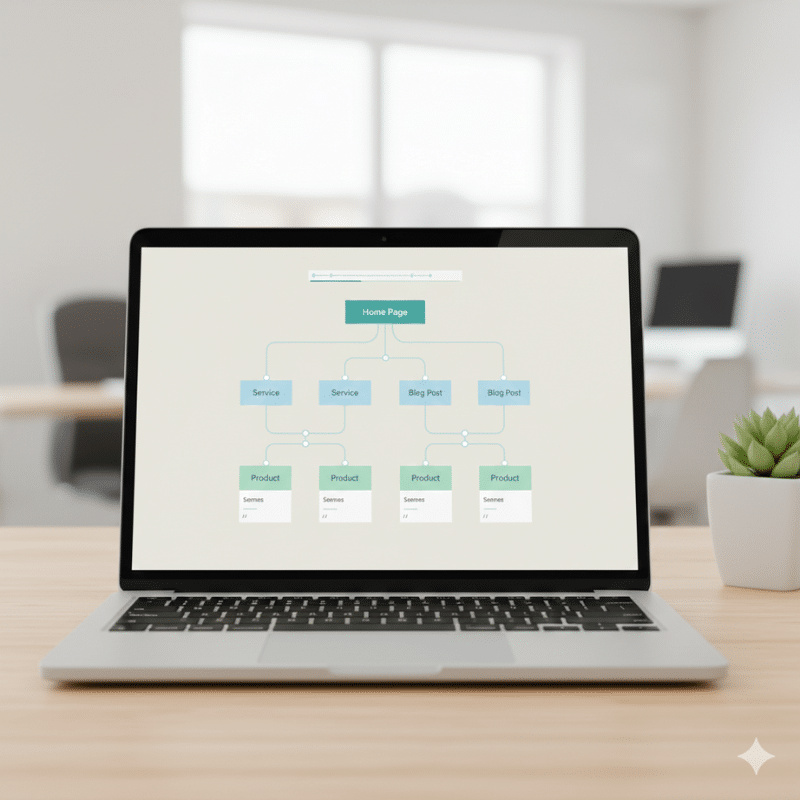
Website structure isn’t just a “nice to have”.
It’s one of the fastest ways to help Google crawl your site.
Understand it properly.
And rank your most important pages.
When the structure is messy, good content gets ignored.
When the structure is clean, average content often performs better.
This matters for Australian businesses of every size.
From local tradies to national ecommerce brands.
From Sydney start-ups to multi-location service companies.
Below are seven quick wins.
They’re practical.
They’re measurable.
And most can be done without a full redesign.
What “website structure” means for SEO
Website structure is how your pages are organised and connected.
It includes:
• Your navigation menu
• Your categories and subcategories
• Your internal links
• Your URL format
• Your breadcrumbs
• Your sitemaps
• How deep key pages sit from the homepage
A simple way to think about it:
• Structure tells users where to go
• Structure tells search engines what matters
Good structure reduces confusion.
For people and for bots.
The Australian Government’s GovCMS guidance describes information architecture as organising content so users can easily find and use it.
That’s a user experience point.
But it’s also an SEO point.
Because Google loves what users love.
Clarity.
Speed.
Findability.
Quick self-check before you start
Run this 5-minute scan.
Ask:
• Can I reach my top service or product pages in 2–3 clicks?
• Do key pages receive internal links from relevant pages?
• Are there pages with no internal links pointing to them (orphan pages)?
• Do my URLs look consistent and predictable?
• Does my menu reflect how customers search and decide?
If you answered “not really” to any of these, you’re in the right place.
Now let’s turn structure into rankings.
Quick Win 1: Flatten your click depth for key pages
If a page is buried, it’s harder to rank.
And harder to crawl.
What this looks like when it’s broken
• Your “money pages” sit 4–6 clicks deep
• Blog posts are easy to reach, but service pages aren’t
• Important pages rely on search to be discovered
What to do
Aim for:
• Homepage → Category/Hub → Key page
That’s it.
Ways to flatten structure quickly:
• Add a “Services” hub page that links to all core services
• Add links to top pages from the homepage, footer, or primary menu
• Add “Related services” blocks on service pages
• Add “Popular resources” blocks on key blog posts
How to check
• Use a crawler (Screaming Frog or Sitebulb) to review click depth
• In Google Search Console, watch for pages that are “Discovered – currently not indexed” (often a structure signal)
Why it helps
A flatter structure:
• Improves crawl efficiency
• Concentrates internal authority on priority pages
• Helps Google understand what you want to rank
Quick Win 2: Fix orphan pages (the silent SEO killer)
Orphan pages are pages with no internal links pointing to them.
They’re easy for Google to miss.
And easy for customers to never find.
What this looks like when it’s broken
• Old blog posts that aren’t linked anywhere
• Location pages that exist but aren’t in navigation
• Campaign landing pages left behind after promos
What to do
Pick your approach:
• If the page matters, link to it from a relevant hub
• If it doesn’t matter, redirect it or remove it
• If it’s required but not for SEO, consider noindex (case-by-case)
Quick linking fixes:
• Add it into a topic cluster (more on that below)
• Add it to the “related articles” sections
• Link from higher-traffic pages with aligned intent
How to check
• Run a crawl and compare it to your XML sitemap
• If a URL appears in the sitemap but not in the crawl, it’s often orphaned
Why it helps
Fixing orphan pages can lead to:
• Faster indexation
• Better distribution of internal authority
• Improved topical relevance signals
Quick Win 3: Build “hub pages” that match how people search
This is one of the quickest structure upgrades you can make.
Especially for Australian service businesses.
A hub page is a central page on a topic.
It links out to supporting pages.
And those pages link back.
Think:
• “SEO Services” hub → Technical SEO / Local SEO / Ecommerce SEO / SEO Audits
• “Electrical Services” hub → Switchboard upgrades / Lighting / Emergency call-outs
• “NDIS Services” hub → Support coordination / Plan management / SIL
What this looks like when it’s broken
• You have 20 blog posts on a topic, but no central page
• Your content competes with itself (keyword cannibalisation)
• Users don’t know where to start
What to do
Create one hub per major theme.
On the hub page:
• Define the topic in plain language
• Add a short “how to choose” section
• Link to the most useful supporting pages
• Keep it updated
On supporting pages:
• Answer one clear subtopic
• Link back to the hub
• Link to 2–4 other relevant supporting pages
How to check
• Review internal links for your key topics
• If the link pattern looks random, you need hubs
Why it helps
Hubs create structures Google can understand.
And a structure users can follow.
It’s one of the cleanest ways to build authority without “more content”.
You organise what you already have.
If you want help building hubs that drive commercial outcomes (not just traffic), explore our professional SEO services in Australia.
Quick Win 4: Make internal linking deliberate (not accidental)
Internal links are your ranking levers.
But only if you use them strategically.
Marketix calls internal linking one of the fastest ranking boosts, especially when you point menus and footers to important commercial pages.
That’s a good start.
Now let’s make it sharper.
What this looks like when it’s broken
• Important pages have very few internal links
• Blog posts link to other blog posts, but not to services
• Links use vague text like “click here” or “read more”
• You link to the homepage constantly, even when it’s not relevant
What to do
Use a simple internal linking rule:
• Every supporting page should link to one relevant money page
• Every money page should link back to at least one hub
• Every hub should link to its top supporting pages
Where to add internal links fast:
• The first 200 words of a page (when it’s natural)
• Mid-page “Next steps” blocks
• End-of-page “Related services” sections
• Navigation and footer (carefully)
Anchor text tips:
• Use descriptive phrases that reflect intent
• Keep it natural
• Avoid repeating the same anchor across dozens of pages
If you’re unsure how to prioritise internal links (or which pages deserve them), you can learn more about SEO services and what a proper structure-led strategy looks like.
Quick Win 5: Clean up your URL structure so it tells a story
URLs are a structured signal.
They help humans.
They help bots.
And they reduce messy duplication.
What this looks like when it’s broken
• Mixed formats like /services/seo and /SEO-services and /seo_service
• Random folders that don’t reflect hierarchy
• Long, parameter-heavy URLs for important pages
• Old URLs that still exist and compete with new ones
What to do
Aim for:
• Short
• Lowercase
• Consistent
• Reflective of hierarchy
Examples of clean patterns:
• /services/seo/
• /services/seo/technical-seo/
• /blog/website-structure-seo/
Avoid:
• Changing URLs “just because”
• Large-scale URL changes without redirects
• Multiple pages targeting the same intent under different paths
If you do need to change URLs:
• Map old to new
• Implement 301 redirects
• Update internal links to the new URL
• Re-submit sitemaps in Search Console
How to check
• Crawl your site and sort URLs by folder depth
• Look for inconsistent naming
• Identify duplicate URLs that serve similar content
Why it helps
Clean URLs reduce ambiguity.
They support better crawling.
And they make internal linking cleaner.
Quick Win 6: Add breadcrumbs and tighten navigation labels
Navigation isn’t just design.
It’s the SEO structure.
If your menu labels don’t match how customers think, users bounce.
If your menu labels don’t match how Google interprets intent, relevance suffers.
Breadcrumbs create a clear pathway.
They also reinforce hierarchy.
What this looks like when it’s broken
• Menus use internal jargon like “Solutions” or “Capabilities”
• Users can’t tell the difference between categories
• Category pages exist but aren’t reachable from navigation
• No breadcrumbs, so users get lost
What to do
Navigation quick wins:
• Rename labels to match user intent (e.g., “SEO Services” not “Growth”)
• Keep your top-level menu lean
• Use dropdowns to reflect hierarchy
• Link to hubs, not dozens of individual pages
Breadcrumb quick wins:
• Add breadcrumbs to blog posts and category pages
• Ensure breadcrumbs reflect the real URL hierarchy
• Keep anchor text readable and consistent
How to check
• Ask someone unfamiliar with your business to find a page in under 10 seconds
• If they hesitate, your labels are unclear
• Compare menu wording to what people type into Google (your Search Console queries help here)
Why it helps
Better navigation:
• Improves engagement
• Reduces pogo-sticking
• Helps Google understand page relationships
According to GovCMS best practice guidance, clear headings and scannable content are essential for improving findability and usability.
Quick Win 7: Fix indexation and sitemap signals (so Google focuses on the right pages)
Not every page deserves to be indexed.
And not every indexed page helps you.
Structure is also about focus.
What this looks like when it’s broken
• Thin tag pages indexed for no reason
• Filtered URLs indexed (common in e-commerce)
• Old pages indexed that should be redirected
• Duplicate versions of pages (with and without trailing slashes, parameters, etc.)
What to do
Quick focus improvements:
• Ensure your sitemap only includes index-worthy pages
• Use canonical tags properly (especially for parameters)
• Block crawl traps (filters, infinite URL combinations)
• Consolidate duplicates with redirects or canonicals
• Remove low-value pages from internal linking pathways
How to check
In Google Search Console:
• Pages report → look for “Crawled – currently not indexed” and “Duplicate” statuses
• Sitemaps → check submitted vs indexed count
• Links → review top internally linked pages (are they actually important?)
Why it helps
Better indexation signals lead to:
• Higher crawl efficiency
• Faster visibility for priority pages
• Less “noise” competing with your best content
If you want a structure-led audit that targets crawlability and indexation (not generic checklists), check our comprehensive SEO solutions available.
The 10-minute action plan
If you only have a short window, do this:
• Identify your top 5 money pages
• Ensure each is reachable within 2–3 clicks
• Add 3–5 internal links to each from relevant pages
• Fix at least 5 orphan pages by linking them into hubs
• Clean one messy URL pattern (start small)
• Review Search Console for indexation issues
• Submit an updated sitemap if needed
Small moves.
Clear outcomes.
Fast feedback.
FAQs
What is website structure in SEO?
Website structure is the way your pages are organised and linked.
It helps users navigate.
It helps search engines crawl and understand your content.
How does site structure improve rankings?
Better structure:
• Makes important pages easier to find and crawl
• Sends clearer relevance signals through internal links
• Concentrates authority on priority pages
• Improves user engagement, which supports SEO performance over time
What’s the fastest website structure fix?
Internal linking.
Especially linking relevant blog content to key service pages.
It’s fast to implement and easy to measure.
How many clicks should a page be from the homepage?
As a general target:
Important pages should be within 2–3 clicks
Deeper pages can still rank.
But they often take longer to crawl and strengthen.
Do breadcrumbs help SEO?
Breadcrumbs support SEO indirectly.
They improve navigation and reinforce hierarchy.
They also help users understand where they are on the site.
What are orphan pages, and why do they matter?
Orphan pages have no internal links pointing to them.
They’re harder for Google to discover.
And harder for users to reach.
Final thoughts: structure is the quickest “technical SEO” win most businesses ignore
Many businesses chase new content first.
Or new backlinks.
Or new tools.
But structure is often the lever that makes everything else work better.
Get your structure right, and you’ll usually see:
• Faster crawling
• Better indexation
• Stronger rankings for priority pages
• Clearer user journeys that lead to enquiries and sales
And you can do most of it with smart planning, not big dev projects.





